

Apple says the iPhone 18 Pro and iPhone 18 Pro Max reach 50% in about 15 minutes with a cable and about 30 minutes with a MagSafe Charger. Both models also support MagSafe and Qi2 wireless charging at up to 25W.
To get the 15-minute result, you need a 60W-capable adapter with Adjustable Voltage Supply (AVS) and a USB-C cable. Apple doesn't include an adapter in the box, so your old charger may hold you back. Actual times vary with your charger, cable, temperature, settings, and how you use the phone, as Apple notes in its iPhone 18 Pro technical specifications.
What Are the iPhone 18 Pro and Pro Max Charging Speeds?
Both models share the same official charging figures, so choosing one over the other won't change how fast you can top up. The table below shows Apple's listed speeds and what you need to reach them.
| Feature | iPhone 18 Pro | iPhone 18 Pro Max |
|---|---|---|
| Wired fast charging | Up to 50% in about 15 minutes | Up to 50% in about 15 minutes |
| Adapter needed | 60W-capable, USB PD 3.1 or later with AVS | Same |
| MagSafe | Up to 25W, 50% in about 30 minutes with a 35W+ adapter | Same |
| Qi2 | Up to 25W (needs a Qi2.2 or Qi2 25W charger) | Same |
| USB-C port | Charging, DisplayPort, USB 3 (up to 10Gb/s) | Same |
| In the box | USB-C cable only, no adapter | Same |
The biggest gap is between wired and wireless charging, because a cable reaches 50% in half the time. The 25W wireless ceiling only applies with a charger that supports it, which we explain in the MagSafe and Qi2 sections below.
How Fast Is iPhone 18 Pro and Pro Max Wired Charging?
Wired charging is the fastest option, at up to 50% in about 15 minutes with the right adapter. At its September 2026 launch, Apple said this setup charges roughly 33% faster than previous Pro iPhones. Apple also said a five-minute top-up gives about six hours of video playback, which helps when you're about to leave the house.
How Long Does It Take to Charge to 50%?
Apple's 15-minute figure comes from tests it ran in July 2026 on preproduction units. Apple drained each iPhone, then timed the charge from the moment the Apple logo appeared during startup. It used the Apple 40W Dynamic Power Adapter with 60W Max (Model A3351), which supports USB Power Delivery (USB PD) 3.1 with AVS.
Independent testing matches this figure. In a controlled 25°C test from ChargerLAB, reported by ZEERA, an iPhone 18 Pro Max reached 50% in 15 minutes and 80% in 29 minutes.
How Long Does a Full 0 to 100% Charge Take?
Apple doesn't publish a full-charge time, so independent tests are the only guide as of October 2026. The two published results don't agree:
- PhoneArena: A full charge took 1 hour 8 minutes on the iPhone 18 Pro Max, compared with 1 hour 20 minutes on the iPhone 17 Pro Max.
- Cult of Mac report: A Chinese reviewer measured a full charge in 55 minutes on the iPhone 18 Pro Max.
Both tests used the Pro Max, so there's no verified full-charge time for the smaller iPhone 18 Pro yet. The ChargerLAB figures also show that charging slows as the battery fills. The first 50% took 15 minutes, while the next 30% took another 14 minutes.
What Charger Do You Need for iPhone 18 Pro Fast Charging?
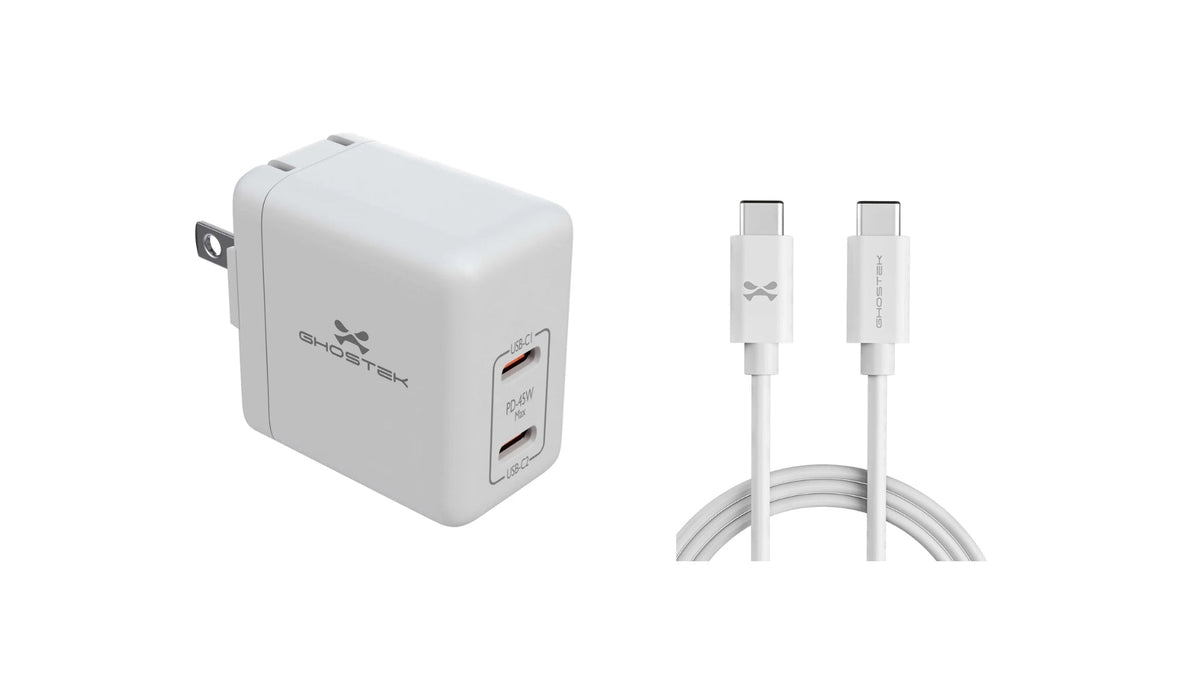
For Apple's 15-minute result, you need a USB-C adapter that supports USB PD 3.1 or later with AVS and delivers 60W or more. You also need a USB-C cable rated for 60W. If you want a longer cable for the desk or bedside, we make the NRGline 6 ft USB-C fast charging cable, and its product page lists the wattage it supports.
What Is the Apple 40W Dynamic Power Adapter With 60W Max?
It's the adapter Apple used in its own tests and the closest match to the "60W" adapter on the spec sheet. No Apple product carries a plain "60W" name. Apple launched this adapter with the iPhone 17 in 2025, so if you already own one, you don't need a new charger. Its name reflects two ratings: 40W for general use, with up to 60W available when a device asks for it.
Can You Use a Third-Party USB-C Charger?
Yes, as long as it meets the same spec. Look for USB PD 3.1 or later, AVS support, and 60W or more on the spec sheet. Chargers without AVS still work, but they charge more slowly. Launch reports from Notebookcheck and iXBT found that some 45W chargers reached 50% in about 20 minutes, close to iPhone 17 Pro speeds.
Tip: Check the spec sheet for "AVS" before you buy. Wattage alone doesn't tell you whether a charger can reach Apple's 15-minute figure.
Does a Higher-Wattage Charger Make iPhone 18 Pro Charge Faster?
No. The iPhone decides how much power it draws, and a bigger charger only offers more headroom. ZEERA's test recorded a peak input of 53W on an iPhone 18 Pro Max, not a steady 60W.
In another ZEERA comparison, a 140W charger charged the iPhone 18 Pro series more slowly through the first 50% to 80% than a 60W AVS adapter. Several 60W to 100W chargers gave similar results. The table below shows how common charger types compare.
| Charger type | Charges the phone? | Reaches Apple's 15-minute figure? |
|---|---|---|
| 20W USB-C PD | Yes, slowly | No |
| 30W to 45W USB-C PD, no AVS | Yes | No (about 20 minutes to 50% reported for some 45W chargers) |
| 60W+ USB PD 3.1 with AVS (including Apple 40W/60W Max) | Yes | Yes, this matches Apple's test setup |
| 65W or 100W PD, no AVS | Yes, at 40W+ at times | Not guaranteed |
| MacBook 96W or 140W | Yes, safely | Often no, and can be slower early in the charge |
AVS support matters more than the number on the label. A laptop charger is safe to use, but a dedicated AVS adapter is the faster choice for quick top-ups.
How Fast Is MagSafe Charging on iPhone 18 Pro and Pro Max?
MagSafe charges both models at up to 25W and reaches 50% in about 30 minutes, according to Apple. You need an Apple MagSafe Charger and an adapter rated at 35W or higher.
How Long Does MagSafe Take to Reach 50%?
It takes about 30 minutes. Apple tested with the MagSafe Charger (1 m Model A3502 and 2 m Model A3503) connected to the 40W Dynamic Power Adapter. That's twice the wired time, so MagSafe suits steady charging more than a rushed top-up.
What Power Adapter Does MagSafe Need?
The MagSafe Charger can only pass on the power its adapter supplies. Apple lists 35W or higher for the 30-minute figure, up from 30W or higher on the iPhone 17 Pro in 2025. A weaker adapter still works, but MagSafe charging will be slower.
How Fast Is Qi2 Wireless Charging?
Apple lists Qi2 charging at up to 25W on both models, but only chargers that support Qi2.2 (also sold as Qi2 25W) deliver that speed. Original Qi2 chargers attach and charge, but they top out at 15W. A plain "Qi2" or "MagSafe compatible" label isn't enough. ZEERA also reports that mainland China models list 15W for both MagSafe and Qi2.
How Do MagSafe and Qi2 Charging Compare?
On paper, MagSafe and Qi2.2 share the same 25W ceiling. MagSafe has Apple's tested 30-minute figure behind it. Qi2.2 gives you a wider choice of third-party gear, such as the Anker MagGo 2 Pro and Belkin UltraCharge Slim 10K power banks.
Does the iPhone 18 Pro Max Charge Slower Than the iPhone 18 Pro?
No. Apple gives both models the same 15-minute wired and 30-minute MagSafe figures. The Pro Max keeps pace even with a larger battery (5,391mAh in PhoneArena's global unit). It also lasts longer, with up to 30 hours of typical use compared with 24 hours on the iPhone 18 Pro. Most independent tests so far use the Pro Max, so real-world results for the smaller model are still unconfirmed.
How Does iPhone 18 Pro Charging Compare to iPhone 17 Pro?
In an iPhone 18 Pro vs iPhone 17 Pro comparison, the gain comes from wired charging. The table below compares official figures with PhoneArena's full-charge tests.
| Feature | iPhone 17 Pro (2025) | iPhone 18 Pro (2026) |
|---|---|---|
| Wired, 0 to 50% | About 20 minutes (40W+ adapter) | About 15 minutes (60W-capable AVS adapter) |
| MagSafe | 25W, 50% in about 30 minutes (30W+ adapter) | 25W, 50% in about 30 minutes (35W+ adapter) |
| Qi2 | 25W | 25W |
| Pro Max full charge (PhoneArena test) | About 1 hour 20 minutes | About 1 hour 8 minutes |
The iPhone 18 Pro reaches 50% about five minutes sooner by cable, while wireless speeds stay the same. In PhoneArena's test, the 18 Pro Max also reached 71% at 30 minutes, compared with 63% on the 17 Pro Max. If you're upgrading from an iPhone 17 Pro, you can keep the same Apple adapter.
Why Is Your iPhone 18 Pro Charging Slowly?
Slow charging usually comes down to the charger, the temperature, or a battery setting. Check these common causes:
- Charger without AVS: An adapter under 60W or without AVS can't reach Apple's 15-minute figure.
- Cable rating: A USB-C cable that isn't rated for 60W can hold back wired speed.
- High battery level: Charging slows as the battery fills, so a top-up from 70% feels slower than one from 10%.
- Heat or cold: Apple lists an operating range of 0°C to 35°C (32°F to 95°F). If the battery gets too warm, iOS may limit charging above 80% until it cools, as Apple explains in its guide for when an iPhone won't charge. A hot car, direct sun, or a bed or pillow can all trap heat.
- Heavy use: Gaming, video, or navigation while plugged in adds heat and slows charging.
- Battery settings: Optimized Battery Charging and Charge Limit can pause charging at 80% or hold it at a limit you set between 80% and 100%.
- MagSafe setup: An adapter under 35W or an original 15W Qi2 charger can lower wireless charging speed. Check the charger's power rating and alignment.
Wired vs MagSafe: What Is the Fastest Way to Charge?
Wired charging with a 60W AVS adapter is the fastest way to charge both models, at about 15 minutes to 50%. MagSafe or a Qi2.2 charger at 25W takes about twice as long. It's easier to use on a desk, nightstand, or car mount, though. We'd reach for a cable when you're short on time and keep wireless charging for everyday and overnight use.
Does a Phone Case Affect iPhone 18 Pro Charging Speed?
A case doesn't change how much power reaches the phone through a cable, but a thick case can trap heat, and heat can slow charging. For wireless charging, alignment matters more. A MagSafe-compatible case keeps the charger centered, while thick, metal, or non-magnetic cases can weaken the connection and slow or stop charging.
Many people worry that a protective case will block MagSafe. At Ghostek, we make iPhone 18 Pro cases and iPhone 18 Pro Max cases in slim clear and rugged styles. Check each product page for MagSafe compatibility before you buy, since it differs by case.
What Are the Most Common iPhone 18 Pro Charging Questions?
What charging cable comes with the iPhone 18 Pro?
A 1 m USB-C Charge Cable comes in the box, with no power adapter.
Can you use an older iPhone charger with the iPhone 18 Pro?
Yes. Any USB-C PD adapter works, but 20W and 30W models charge more slowly than Apple's 15-minute figure. An older USB-A charger needs a USB-A to USB-C cable and charges slowly.
Can a 100W charger damage the iPhone 18 Pro?
No. A compliant USB-C PD charger agrees on power with the phone first. A 100W rating is the charger's capacity, not power forced into the iPhone.
Does fast charging damage the iPhone 18 Pro battery?
Apple doesn't list any limits on using fast charging, and iOS manages heat for you. If the battery gets too warm, iOS may limit charging above 80% until it cools. Keeping the phone out of heat while it charges is the simplest way to help.
Can you charge AirPods from the iPhone 18 Pro USB-C port?
Yes, you can charge small accessories with a USB-C cable.
Does the iPhone 18 Pro support reverse wireless charging?
No. Apple's spec page doesn't list reverse wireless charging, so it isn't an advertised feature.
Can you charge the iPhone 18 Pro overnight?
Yes. Optimized Battery Charging is on by default and can delay charging past 80% when your iPhone predicts it will stay plugged in for a long time.
What Is the Bottom Line on iPhone 18 Pro Charging?
So, how fast can the iPhone 18 Pro charge? With a 60W-capable AVS adapter, both models reach 50% in about 15 minutes. Independent tests on the Pro Max put a full charge at 55 minutes to 1 hour 8 minutes. MagSafe takes about 30 minutes to 50%, with a 25W ceiling for wireless charging. Before you buy a new charger, check its spec sheet for AVS and USB PD 3.1, not just the wattage.

Leave a comment
This site is protected by hCaptcha and the hCaptcha Privacy Policy and Terms of Service apply.